Download oTuner (1.00)
Free, open source chromatic tuner software for Windows and Windows Mobile
Downloads
[Download] Free Chromatic Tuner Software for Windows
[Download] Free Chromatic Tuner Software for Windows Mobile *
[Download] Chromatic Tuner C++ source code
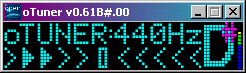
Note! Ensure Volume Bar is Green
The volume bar (on the far right hand side of the main screen) needs to be into the green before the tuner will work reliably (otherwise the indicator arrows become rather flickery). I discovered this by trying to tune my unamplified Hohner G3T headless electric guitar: it is do-able, but you need a microphone right under the strings!
If you are not getting anything at all on the volume bar, you may need to adjust your audio properties: The tuner uses your PC's "Preferred Device" for sound recording. There are various examples of how to configure the microphone as the recording device for Windows PCs floating around.
A good rule of thumb is if you can't record your instrument using Sound Recorder (Start/Programs/Accessories/Entertainment), then the tuner will not be able to hear it either.
NB: if your "Sound Recorder" recording is very noisy, the tuner may find it difficult to distinguish the notes from the noise.
You may also be interested in...
Copyright
This free tuner is released under the GPL v3 Licence. It may only be copied, modified, redistributed etc. under the terms of that licence.
Features
Full instrument / musical chromatic tuner (full frequency range TBD: I know it works for my guitar:);
Indicates whether note is sharp, flat, or exactly right;
Accurate to better than 2 cents;
Runs on every version of windows since 1995 (95, 98, ME, NT, 2000, XP, Vista (I imagine), 7 and hopefully 8:);
Display of current octave number;
Concert pitch reference can be set anywhere from A=430Hz to A=450Hz (e.g., 442 Hz, 443 Hz if required);
Minimalist:)
Installation and How To Use
Just download the executable onto your device* (Windows Mobile (PPC, PDA, PocketPC 2002, 2003, XDA, iPAQ, SmartPhone, etc.) users may want to download to desktop and then use ActiveSync) and double-click it to run.
The coloured bar on the far right of the pitch indicator (blue through green and into the yellow in the example above) is an indication of the volume of the note being played. This needs to be at least into the green (as in the example above) for reliable results to be achieved (otherwise the tuner's indicator will tend to flicker around too much).
The note-name you are playing is displayed on the right hand side of the main screen (D# in the example above). If the filled in arrows appear on the left of the central bar (as in the example above), then the note is too flat (guitarists, tighten your strings!); if the arrows appear on the right, then the note is too sharp (slacken your guitar strings). You should aim to have the central rectangle "bracketed" by filled in arrows: this indicates that the note is at the correct pitch.
If you want to remove the executable: delete it!
* Difficulties with Windows Mobile Internet Explorer
Earlier versions of IE will not render the SourceForge download pages correctly. I recommend Opera Mobile.
To use as a Chromatic Guitar Tuner
Firstly, make sure that the string you are trying to tune is within the correct octave! Standard guitar tuning (low to high) is E2, A2, D3, G3, B3, E4.
With that done, you should be fine to just hit the string (electric guitars will likely need to be amplified), and read the tuner output; you may find 12th-fret harmonics give a more stable reading (they did on my classical guitar).
Using the Tuner with Other Musical Instruments
As it is a proper chromatic tuner, the application should work just fine for any musical instrument (including weird guitar tunings, I have not yet tried it with my bass, but I'd imagine it is fine).
Compiling
The source can be built using the free Microsoft Visual C++20??e (As far as 2010: I don't think the express version of 2012 will work) Compiler for Windows, or the free eVC++4.0 compiler for Windows Mobile (and eMbedded Tools 3.0 for older WinCE3). Unfortunately, MSVC++20??e does not produce executables that will run on Windows 9x or NT (I use my own copy of MSVC++6 for this, try eBay; a workspace is provided in the source ZIP).
Support
I can be contacted at 5thWheel@gmail.com, or through SourceForge; try not to trip gmail's spam filters:)
Thankyou!
Thank you for the real-time music analysis source code from Tartini, Philip McLeod: a cut-down version of the Tartini "hard sums" is the only reason this application does anything at all. I don't entirely understand how they work, so any mistakes are mine, not Philip's: please don't bother him about my work, but do feel free to bother me:) I began this project in order to get the tuner aspect of Tartini running on my PDA; I have had to hack it about a bit in order to move away from FFTW, as I had problems getting it to work on my PDA.
Thank you for Kiss FFT: simple and easy to understand FFT source code in C. Kiss FFT is a tiny, efficient, mixed-radix FFT library that can use either fixed (very useful for ARM developers!) or floating point data types, and has specific routines for real-only input FFTs (and inverses). I used Kiss FFT as an alternative to FFTW (which is what Tartini uses) because I found FFTW hard to understand and gave up any hope of getting it to run on my PDA. Don't get me wrong, I am sure FFTW is very *fast*, but I just don't need that at the cost of its complexity.
Thank me!
If you like my program, please consider Supporting This Project. If you don't like it enough to pay actual money, please do link it from your blogs, websites and forums:)